Exporting for your CAB auditor
CAB auditors accept the official CCB CyFun Self-Assessment workbook as the submission artifact. ECP fills that exact workbook for you and, on request, bundles all linked evidence into a single zip.
Two outputs, one source of truth
- xlsx — the CCB v2026-02-20 workbook with your scores filled in. This is the file the auditor signs off on.
- zip — the same xlsx plus an
evidence/folder containing every linked artifact, wiki page, and integration breadcrumb, cross-referenced by comment in each row.
1. Open Audit Readiness
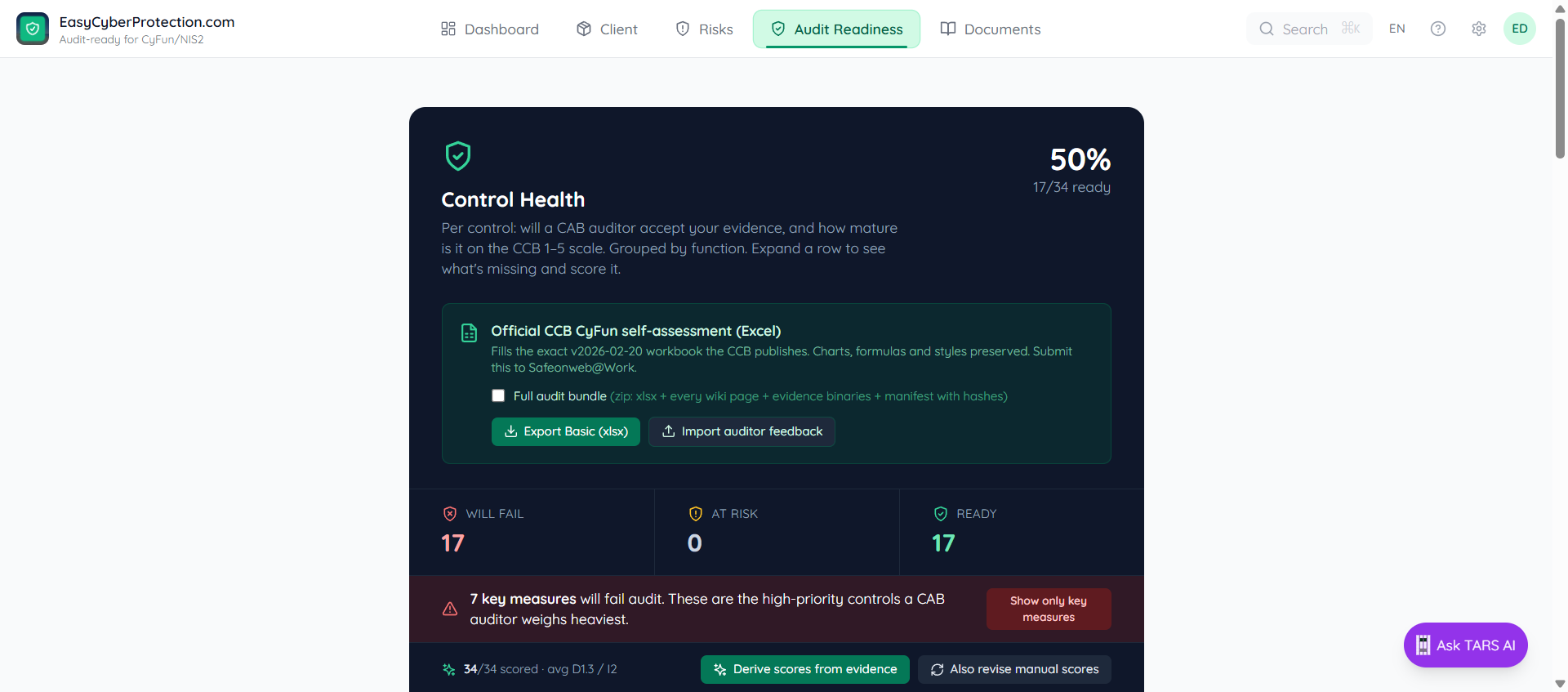
Click Audit Readiness in the top navigation. Below the bucket toggles is a dedicated section titled Official CCB CyFun self-assessment (Excel). The export button labels itself to match your active tier (Export Basic, Export Important, or Export Essential).
If you're unsure of the tier, your IT partner can confirm from the CyFun Level Assessment under Documents → Assessments.
2. Decide what to bundle
Above the tier buttons is a checkbox: Include evidence files (zip: xlsx + linked artifacts + wiki pages as markdown).
Checkbox off — xlsx only
Use this when the auditor has their own access to ECP. Comments in the workbook link back to the control pages inside ECP — the auditor clicks through to see live evidence.
Checkbox on — zip bundle
Use this when you're emailing the file or uploading to a CAB portal. Comments point to local paths (evidence/CCB-REF/…) inside the zip so the auditor can open each artifact without ECP access.
The filename changes automatically: CyFun2025_Basic_YYYY-MM-DD.xlsx or .zip.
3. What's inside the zip
The bundle mirrors the structure a CAB auditor expects:
CyFun2025_Basic_2026-04-19.zip
├── CyFun2025_Basic.xlsx        ← the official CCB workbook, scores filled in
├── README.md                   ← tier, export date, contents overview
└── evidence/
    ├── DE.AE-03.1/
    │   ├── siem-config-snapshot.png
    │   └── incident-response-procedure.md     ← wiki page as plain markdown
    ├── PR.AA-05.1/
    │   └── mfa-enforcement-log.csv
    └── PR.IR-01.1/
└── network-segmentation-diagram.pdf- → Wiki pages are exported as plain
.mdto keep the zip small (typical Basic tier under 20 MB) - → User-uploaded files (PDF, PNG, CSV, DOCX, …) keep their original bytes
- → Integration sources (Microsoft Graph, Sophos, Bitdefender, SentinelOne) export as a short breadcrumb
.mdfile naming the tenant and export timestamp - → External links (URLs you pasted as evidence) stay in the workbook as links — they aren't copied into the bundle
4. Submitting to the auditor
Email the zip or upload it to whatever evidence portal the CAB uses. Include the README.md as a cover note — it lists the tier, export date, total byte count, and anything the auditor should know (missing evidence, unreferenced external links).
Your IT partner can also generate and send the bundle on your behalf from their Partner Dashboard.
Other exports on the same page
The Audit Readiness header also exposes three ECP-native exports — these are not a CAB submission format:
- •CSV — one row per control with bucket, missing requirements, D/I scores, KEY flag — useful for trackers or management reports
- •Excel — branded
.xlsxwith Summary + Controls sheets (ECP-native, not CCB) - •CAB share link — read-only ECP URL for auditors who prefer the live view
For internal steering-committee updates, use Snapshot on the Audit Readiness tab — it freezes the current state as a dated report wiki page under Documents → Reports.